




How to Use a Servo Motor with Arduino–Complete Beginner’s Guide | Best Rates | Buying Guide | Detailed Tips | Maintenance | FAQ |
How to Use a Servo Motor with Arduino – Complete Beginner’s Guide
Whether you're
building a robotic arm, an automatic door, or a pan-tilt camera mount, servo
motors are essential for precise movement control. When combined with Arduino,
servo motors become even more powerful, offering endless possibilities for
automation and hobby electronics.
In this article, we will explore how a servo motor works with Arduino, its key benefits, real-world applications, top product recommendations, and a detailed buying guide. Whether you're a beginner, student, or hobbyist, this guide will help you get started confidently.
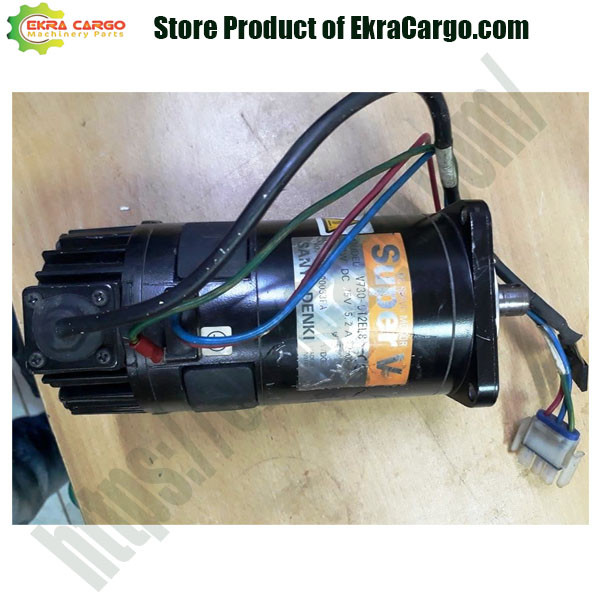
Check the product at Ekra Cargo
What Is a Servo Motor?
A servo motor
is a rotary actuator or linear actuator that allows for precise control of
angular or linear position, velocity, and acceleration. It’s commonly used in
robotics, CNC machinery, drones, and hobby projects.
Key
Features of Servo Motors:
- Precision
control
- High torque
in a small package
- Easy
interfacing with microcontrollers (like Arduino)
- Available in
different sizes (micro, standard, heavy-duty)
⚙️ How a Servo Motor Works with Arduino
Servo motors
typically use Pulse Width Modulation (PWM) signals to determine the
shaft position. Arduino boards (like Uno, Nano, or Mega) can easily generate
these PWM signals using built-in libraries such as Servo.h.
Basic
Connection Overview:
- VCC → 5V on
Arduino
- GND → GND on
Arduino
- Signal →
PWM-capable pin (e.g., D9)
✅ Benefits of Using Servo Motors with
Arduino
|
Benefits |
Description |
|
Easy to Control |
Just one signal
pin is needed for rotation |
|
High Precision |
Ideal for
accurate positioning |
|
Compact |
Perfect for
small spaces in robotics projects |
|
Plug & Play |
Easily
available with compatible connectors |
|
Widely Supported |
Tons of
tutorials, libraries, and community support |
Recommended Servo Motors for Arduino
Projects
Here are some of
the best servo motors for Arduino, along with their pros and cons:
1. SG90 Micro Servo Motor
Ideal
For: Lightweight projects
like mini robots, pan-tilt cameras, and RC planes.
Specifications:
- Operating
Voltage: 4.8V – 6V
- Torque: 1.8
kg-cm
- Rotation
Range: 180°
Pros:
- Lightweight
and compact
- Very
affordable
- Works
directly with Arduino 5V output
Cons:
- Limited
torque
- Plastic
gears (less durable)
2. MG996R Metal Gear Servo Motor
Ideal
For: Robotic arms,
heavier loads, and precise movement tasks.
Specifications:
- Operating
Voltage: 4.8V – 7.2V
- Torque: 9.4
kg-cm at 6V
- Rotation
Range: 180° (can be modified to 360°)
Pros:
- High torque
- Metal gears
for longer life
- Affordable
mid-range servo
Cons:
- Slightly
heavier
- May require
external power source for consistent operation
3. DS3218 20KG High Torque Digital Servo
Ideal
For: Heavy-duty
robotics, RC cars, and industrial automation.
Specifications:
- Operating
Voltage: 6.8V – 7.4V
- Torque: Up
to 20 kg-cm
- Digital PWM
control
Pros:
- Super high
torque
- Digital
precision
- Durable
build
Cons:
- Not for
beginners
- Needs
separate power supply
Servo Motor + Arduino Project Ideas
Here are a few
exciting projects where servo motors and Arduino go hand-in-hand:
1.
Robotic
Arm – Control
multiple servos for realistic arm movements.
2.
Smart
Door Lock – Use servo to
rotate and lock/unlock mechanisms.
3.
Automated
Blinds – Rotate window
blinds based on light sensor input.
4.
RC
Car Steering
– Servo for left-right wheel movement.
5.
Pan-Tilt
Camera – Move your
camera for face tracking or surveillance.
Buying Guide: Choosing the Right
Servo Motor for Arduino
When selecting a
servo motor, consider the following:
1. Torque Requirement
- Lightweight
projects (SG90 or MG90S)
- Heavy-duty
use (MG996R or DS3218)
2. Voltage Compatibility
- Match with
your Arduino (usually 5V)
- Use external
power for high-torque servos
3. Control Angle
- Standard:
180°
- Continuous
Rotation: 360° (for wheels, conveyors)
4. Build Material
- Plastic
gears: lightweight, cheaper
- Metal gears:
durable, high-load applications
5. Size & Weight
- Match to
your project's constraints
6. Brand & Quality
- Trusted
brands: Tower Pro, JX Servo, Feetech, etc.
⚡ Tips for Using Servo Motor Safely
with Arduino
1.
Power
It Separately:
High-torque servos may draw more current than Arduino can supply.
2.
Use
Capacitors:
Helps smooth voltage spikes.
3.
Avoid
Continuous Rotation Unless Needed: Not all servos support full 360° motion.
4.
Test
First: Use serial
monitor to debug motion and timing.
5.
Use
External Power Supply:
For MG996R or DS3218, always use a 6V–7.2V external power source with proper
current rating (2A or more).
Frequently Asked Questions (FAQs)
Q1: Can I use multiple servos with one
Arduino?
Yes, you can control several servo motors
using multiple PWM pins or using servo driver boards like PCA9685.
Q2: Can I power a servo directly from Arduino?
Small servos like
SG90 can be powered directly. However, higher torque models must use an
external power supply.
Q3: Do servo motors rotate 360 degrees?
Standard servos
rotate up to 180°. Some are modified for continuous rotation (360°),
but they lose position control.
Q4: What is the difference between a servo and
a stepper motor?
- Servo:
Position-controlled using PWM, good for precise angles
- Stepper: Rotates in
steps, better for continuous or repetitive motion control
Conclusion
Using a servo
motor with Arduino is one of the best ways to dive into the world of
robotics and electronics. It's beginner-friendly, versatile, and has
applications in countless DIY and professional projects. Whether you're
creating a smart device, building a robot, or exploring IoT systems, servo
motors bring accuracy and control at your fingertips.
Choose the right
servo based on torque, rotation angle, and project needs. Start with basic
models like SG90 for simple tasks or upgrade to MG996R or DS3218
for more demanding applications.
Ready to Buy?
Explore our collection of tested and recommended servo motors for Arduino
on our E-commerce Website. Affordable prices,
bulk discounts, and expert support!


Ekracargo.com - Your trusted partner in industrial efficiency, providing a wide range of premium quality spare parts at competitive prices.
Contact Info
- Address: House 54 | Road 14 | Sector 14 | Uttara | Dhaka 1230 | Bangladesh
- Phone: Contact: +8801634736139 (WhatsApp) ,+8801789394669 (WhatsApp)
- Email: info@ekracargo.com